
Ever built a feature you were sure was a game-changer, only to release it to the sound of crickets? It’s a gut-wrenching feeling, and for a bootstrapped SaaS founder, it’s a costly mistake. Every line of code, every marketing pound, is a resource you can’t afford to waste.
Stop Building Features Nobody Wants
The biggest risk you face isn’t a competitor with a bigger budget; it’s the quiet indifference of a market that doesn’t need what you’ve built. This is where the Value Proposition Canvas stops being a stuffy business school diagram and becomes your most important strategic map.
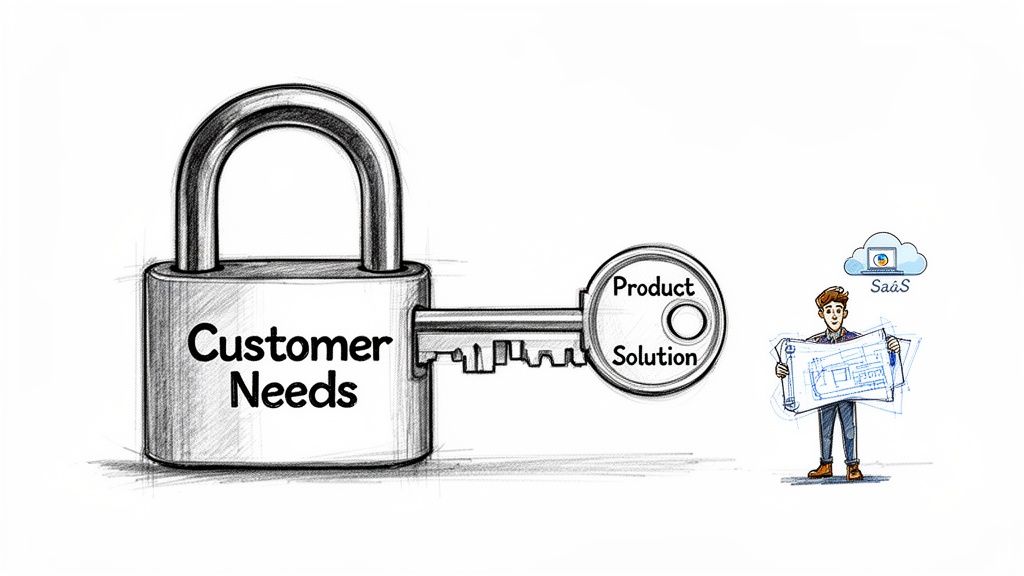
Think of it like a lock and a key. Your customer’s world—their goals, their daily frustrations, the tasks they need to get done—is the intricate lock. Your SaaS product, with its specific features and benefits, is the key. When it’s a perfect fit, the lock turns effortlessly. When it’s a misfit, you’re just jiggling a key that will never work, no matter how much you want it to.
The Two Halves of Product-Market Fit
The canvas is brilliant in its simplicity. It splits this huge challenge into two distinct halves, forcing you to step outside your own head and focus obsessively on the customer first. You analyse each side separately before seeing how they connect.
-
The Customer Profile (The Circle): This is where you become an anthropologist. You dive deep into your customer’s world, documenting their reality without even thinking about your solution. You map out their jobs-to-be-done, the pains that get in their way, and the gains they’re hoping to achieve.
-
The Value Map (The Square): Now, you put your product designer hat on. This is where you design the perfect answer to everything you just uncovered. You’ll list your product’s features and services, then explicitly connect them to how they relieve those customer pains and create their desired gains.
This methodical process is all about swapping guesswork for evidence. It’s not just another abstract framework you fill out and forget; it’s a practical tool for de-risking your entire venture.
By meticulously mapping customer pains to your product’s pain-relieving features, you shift from making assumptions to building on evidence. This ensures every feature you develop has a validated purpose and a direct line to creating customer value.
Ultimately, the goal is to find that perfect “fit” between the two sides. When your Value Map mirrors the needs of the Customer Profile, you know you’re onto something. For bootstrapped founders, this isn’t just a helpful exercise—it’s the fastest way to validate an idea before you pour your most precious resources into it: your time and your money. It’s the essential first step to building something people will actually pay for.
Decoding Your Customer’s World
Before you even think about your product, stop. Seriously. The biggest mistake founders make is rushing to talk about their solution. The real magic begins with a deep, empathetic dive into your customer’s reality. That’s the entire point of the Customer Profile—the circle on the right side of the canvas.
Think of yourself as an anthropologist, observing a user in their natural habitat. Your only job right now is to watch, listen, and understand their world from their perspective. You’re mapping their professional life to figure out what drives them, what frustrates them, and what they secretly wish for every day.
The Customer Profile is broken down into three simple, yet powerful, segments. By tackling them one by one, you’ll build a picture of the person you’re trying to help that’s based on reality, not just your own assumptions.
What Is Your Customer Really Trying to Accomplish?
First up: Customer Jobs. This isn’t about their job title or a boring list of responsibilities. It’s about the fundamental things they’re trying to get done, the problems they need to solve, or the needs they’re trying to meet.
To get a clearer picture, let’s break these jobs down.
- Functional Jobs: These are the obvious, practical tasks. For a project manager at a growing SaaS company, this is stuff like “organise project timelines,” “assign tasks to the team,” or “report progress to the leadership.” The bread and butter of their day.
- Social Jobs: This is all about perception. How do they want to be seen by others? That same project manager might have a social job like, “appear competent and in control to my boss” or “be seen as a helpful collaborator by my colleagues.” It’s about status and reputation.
- Emotional Jobs: Now we’re getting to the good stuff. How do they want to feel? This could be anything from “feel secure about hitting our deadlines” to “get that sense of accomplishment from a project that just works.”
Thinking across these three dimensions gives you a much richer understanding than a simple task list ever could. You start to see the why behind their actions, not just the what.
Where Does It All Go Wrong for Them?
Once you know what your customer is trying to do, it’s time to identify their Pains. These are the roadblocks, the frustrations, and the “head-on-desk” moments they face while trying to get their jobs done.
Pains are the grit in the gears of their workflow. They’re the moments that waste time, cause stress, or make them wish they’d chosen another career. These are the problems you’re here to solve.
Pains aren’t just minor annoyances. They are the real, tangible obstacles holding your customer back. The key is to quantify these pains—in wasted hours, lost revenue, or mounting risk—because that’s how you build a solution they’ll happily pay for.
For our SaaS project manager, common pains might be:
- Juggling five different tools for chat, tasks, and files. It’s a mess.
- Losing crucial feedback because it’s buried in a random email thread from last Tuesday.
- Spending hours every Friday manually pulling data for weekly status reports.
- The constant fear that a tiny detail will fall through the cracks and derail the entire project.
What Does a “Win” Look Like to Them?
Finally, we map out their Gains. This is often the most insightful part of the exercise. Gains aren’t just the opposite of pains; they are the specific outcomes and benefits your customer is aiming for. This is their definition of success.
Gains can be basic requirements (“the software has to actually work”) or unexpected delights that make their day. A deep dive into your customer’s aspirations is what separates a good product from a great one. For a more detailed look at this, check out our guide on how to properly identify customer needs.
For our project manager, their desired gains could be:
- Having one single, central place for all project information. The holy grail.
- Automating those soul-crushing reports so they can focus on work that matters.
- Seeing exactly where the team is at, in real-time, without having to chase people down.
- Effortlessly showing management the project’s value and ROI with clear data.
By meticulously documenting these jobs, pains, and gains, you create a detailed blueprint of your customer’s world. This profile becomes the rock-solid foundation for your value proposition, turning your product from a random collection of features into a laser-focused solution for real-world problems.
Designing Your Product as the Solution
Alright, you’ve spent quality time mapping out your customer’s world. You’ve listened, you’ve empathised, and now it’s finally time to pivot and think about your product. This is where we shift to the left side of the Value Proposition Canvas—the Value Map. It’s the square that sits directly opposite your customer’s circle, waiting to be filled.
If the Customer Profile was all about understanding the lock, the Value Map is where you meticulously design the key. Every single feature, benefit, and marketing claim you dream up must directly answer a job, pain, or gain you’ve already identified. This isn’t about brainstorming cool features in a vacuum; it’s about crafting a precise solution to a problem you now understand inside and out.
This alignment is powerful. It ensures you build a product that customers not only get but feel was made just for them. It’s the difference between offering a random box of tools and a purpose-built solution.
Forging the Key, One Piece at a Time
Just like the Customer Profile, the Value Map is broken down into three corresponding segments. Your goal here is to fill each one with answers that connect directly back to your customer’s reality. Let’s imagine we’re building that SaaS tool for the project manager we met earlier.
-
Products & Services: This is the most straightforward bit. List the tangible features your product actually offers—what your customer will buy and use. For our project manager, this might include things like an “Integrated project dashboard,” “Automated report generator,” and a “Centralised communication hub.” Keep it focused on the core offerings that get their jobs done.
-
Pain Relievers: Now, let’s connect your product directly to their frustrations. How, specifically, do your features get rid of the pains you uncovered? A strong pain reliever is a direct antidote. For example, the “Centralised communication hub” directly relieves the pain of “losing crucial feedback in random email threads.” It explicitly states how you make their problem go away.
-
Gain Creators: Finally, explain how your product delivers on their desired outcomes and ambitions. How do you help them achieve what they consider a “win”? Your “Automated report generator” is a perfect Gain Creator because it helps them achieve the gain of “automating soul-crushing reports so they can focus on work that matters.” This is where you deliver the value that makes them feel successful.
To really get inside your customer’s head and translate those insights into a killer value prop, it helps to understand the fundamentals of user experience design, including mastering the UX design process steps.
This image breaks down the core components of the customer profile—their Jobs, Pains, and Gains—that your product must address.
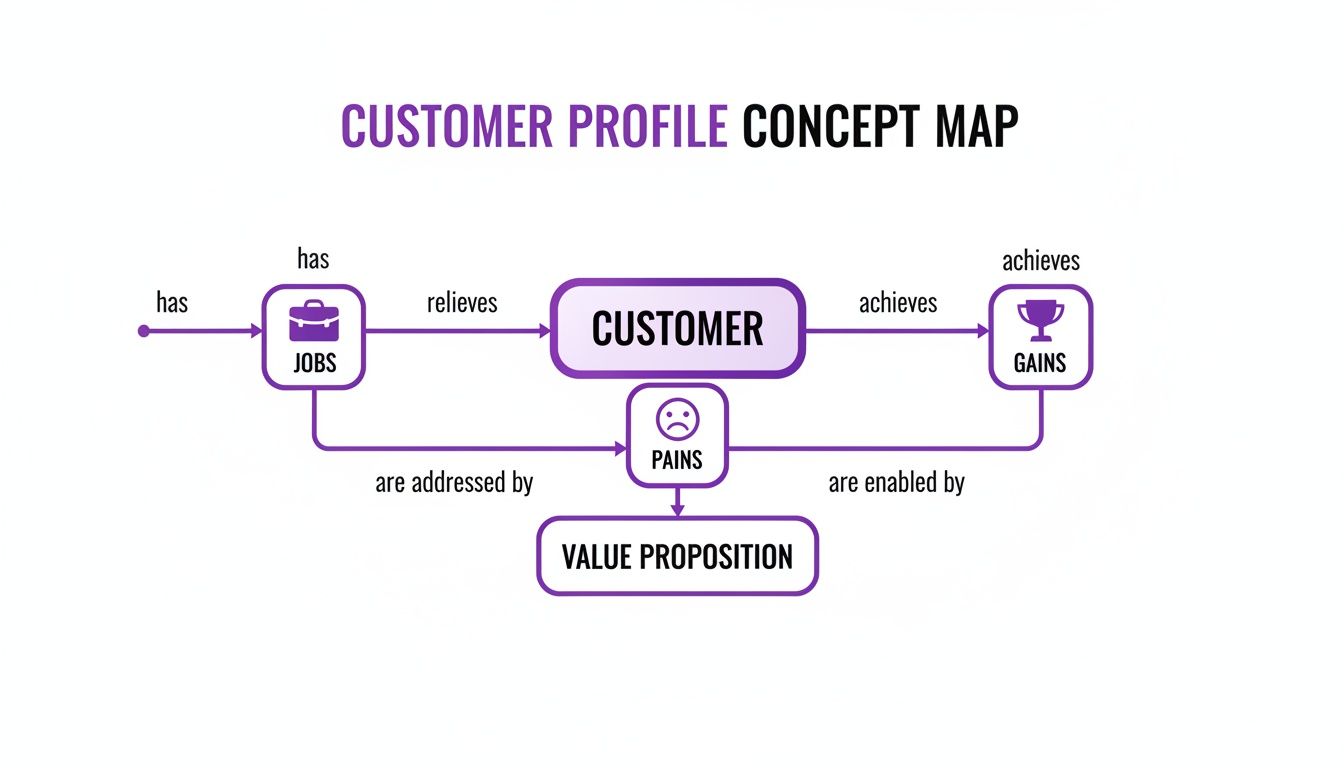
Think of this as the target. The map clearly shows the three distinct elements that form a complete picture of your customer’s needs, giving your Value Map a clear mission.
Mapping Customer Needs to SaaS Features
To make this crystal clear, here’s how the two sides of the canvas talk to each other. We’re showing how specific customer profile elements are directly addressed by features in our example communication tool.
| Customer Profile Element | Type | HappyPanda Feature (Value Map) |
|---|---|---|
| “I need to share progress reports with stakeholders.” | Job | Automated Report Generator |
| ”I’m tired of tracking feedback across Slack, email, and tickets.” | Pain | Centralised Communication Hub |
| ”I want to automate admin tasks to focus on strategic work.” | Gain | Workflow Automations |
| ”I hate having to switch between multiple apps to find information.” | Pain | Integrated Project Dashboard |
See the connection? Each feature exists for a specific, customer-validated reason, creating a direct line between their problem and your solution.
The Power of a Perfect Match
The whole point of the Value Proposition Canvas is to achieve what’s known as a “fit.” This magic moment happens when the features and benefits on your Value Map align perfectly with the jobs, pains, and gains on your Customer Profile.
A strong fit is when a customer reads your product description and thinks, “Finally, someone gets it.” Every pain reliever you offer should tackle a real pain, and every gain creator should deliver a desired gain. This is the bedrock of product-market fit.
For a bootstrapped founder, this mapping process is the most effective way to eliminate guesswork. It forces you to justify every feature with a clear customer purpose. If a feature doesn’t relieve a pain or create a gain, it’s just noise—a distraction that burns through your limited resources. The canvas gives you visual proof that you’re building something people genuinely need. This philosophy is at the heart of what we discuss in our guide on user-centered design.
When you nail this fit, your marketing messages practically write themselves. Your sales conversations get easier. Your product roadmap becomes crystal clear. You stop building random stuff and start building the exact solution your customers have been waiting for.
Right, enough theory. The real magic of the Value Proposition Canvas happens when you get your hands dirty—or, more likely, when you start slapping sticky notes onto a whiteboard (digital or otherwise). This is the moment abstract ideas about what your customer might want transform into a concrete blueprint for a product they’ll actually pay for. It’s time to bridge that gap between knowing what the canvas is and actually doing it.
Let’s walk through this process together. We’ll put ourselves in the shoes of a bootstrapped founder with a new micro-SaaS idea: a simple tool to help freelance social media managers create and schedule client content calendars. We’re going to start with a blank canvas and fill it out, piece by piece, to show you how a fuzzy concept becomes a laser-focused solution.
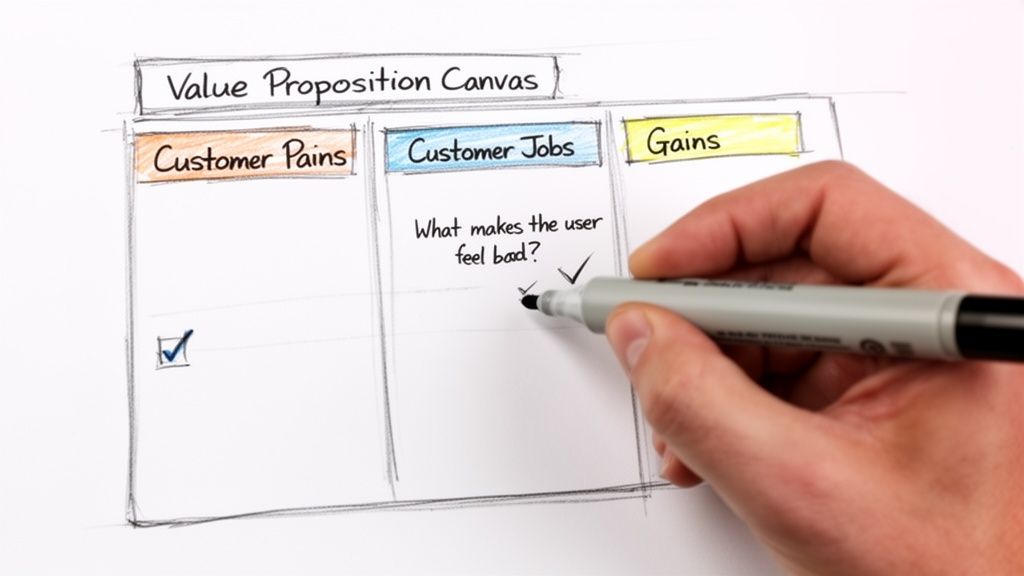
This hands-on approach is what makes the whole thing click. You’re not just filling in boxes; you’re building genuine empathy and sharpening your product’s purpose with every single note.
First, Get Inside Your Customer’s Head
Always, always start on the right side of the canvas—the Customer Profile. For the next ten minutes, forget your product even exists. Your only mission is to crawl inside the mind of your target user: the freelance social media manager. We’ll use a few prompts to get the ball rolling.
1. Nail Down Their Jobs-to-be-Done What are the fundamental tasks they are trying to accomplish day in and day out?
- Prompt: What is your user really trying to get done in their work and life? Think beyond just ‘using software’.
- Our SaaS Example:
- Functional Jobs: “Plan content for multiple clients,” “Get content approved,” “Schedule posts across platforms without losing my mind.”
- Social Jobs: “Look organised and professional to my clients,” “Prove the value of my work with clear results.”
- Emotional Jobs: “Feel in control of a chaotic workload,” “Stop the last-minute panic of creating content on the fly.”
2. Dig into Their Pains What drives them crazy? What obstacles get in their way before, during, and after trying to do their jobs?
- Prompt: What makes your user feel bad? What are their biggest headaches and roadblocks?
- Our SaaS Example:
- “Client feedback is a total mess—scattered across emails, DMs, and random texts.”
- “Manually copying and pasting approved content into a separate scheduler is soul-destroying.”
- “It’s impossible to give clients a clean, high-level view of the upcoming content plan.”
- “The constant fear that a post will go live without that final client sign-off.”
3. Uncover the Gains They’re Chasing What does success look like for them? What are the outcomes and benefits they secretly (or not-so-secretly) crave?
- Prompt: What would make your customer feel like a rockstar? What would make their job easier or more successful?
- Our SaaS Example:
- “A single, central place for all client communication and approvals. A ‘source of truth’.”
- “One-click scheduling the second a post is approved.”
- “A beautiful, shareable calendar link I can send to clients that makes me look good.”
- “Peace of mind. Just knowing nothing gets published without that final tick.”
By starting with the customer, you anchor your entire product strategy in real-world needs, not just cool features. Every pain and gain you list becomes a target for your solution, ensuring you’re building something that actually matters.
Now, Let’s Map Your Value
With a crystal-clear picture of our freelance social media manager, we can finally shift to the left side of the canvas—the Value Map. The goal here is simple: design a product that fits their world like a key in a lock. Every single item we list now must directly answer something we uncovered on the right side.
1. List Your Products and Services What are the core features you plan to build?
- Our SaaS Example:
- Visual Content Calendar
- Client Approval Workflow
- Direct Social Media Scheduler
- Shareable Client View Portal
2. Show How You’ll Be Their Painkiller How, specifically, does your product make their pains vanish?
- Prompt: How does your product eliminate the negative emotions, unwanted costs, or risks your customer is dealing with?
- Our SaaS Example:
- “Eliminates scattered feedback” by centralising all comments and approvals right on the content calendar.
- “Removes manual scheduling” by automatically connecting approved posts to the scheduler. No more copy-paste.
- “Simplifies client previews” by giving them a single, clean, read-only link to view the plan.
3. Outline How You’ll Create Their Gains How does your product deliver the results and good feelings they desire?
- Prompt: How will your product create the benefits your customer expects, wants, or would be totally delighted by?
- Our SaaS Example:
- “Creates a single source of truth” with that central calendar and approval hub.
- “Delivers ‘one-click’ efficiency” by making the whole workflow seamless.
- “Enhances client professionalism” with polished, branded portals that make the freelancer look top-tier.
- “Provides total approval security” with an automated lock that prevents unapproved content from ever going live.
This step-by-step process takes a vague idea and turns it into a highly focused solution. Notice we didn’t just invent features out of thin air; we crafted them as direct answers to real, validated customer needs. Now you can use this exact method to build your own Value Proposition Canvas and move forward with the confidence that you’re building something people will actually value.
Finding Product-Market Fit with a Living Canvas
So, you’ve filled out your Value Proposition Canvas. The most dangerous thing you can do now is frame it, hang it on the wall, and admire your work. Think of it less like a finished painting and more like a treasure map—one where the X’s are just educated guesses until you start digging.
The real magic of the canvas isn’t in that first brainstorming session. It’s in its constant evolution. Every sticky note you placed, especially on the Customer Profile side, isn’t a fact. It’s an assumption. It’s your best guess about your customer’s world, and now your job is to get out of the building and see if you were right.
This turns your canvas from a collection of hypotheses into a battle-tested strategy. It creates a powerful feedback loop: the canvas tells you what questions to ask, and your customers’ answers tell you how to fix the canvas. For a bootstrapped founder, this is the fastest way to build something people actually want.
From Assumptions to Testable Hypotheses
The first step is to treat every point on your canvas as a question, not a statement. This simple mental shift moves you from a state of “knowing” to a state of “learning”—the only place a founder can afford to be.
Let’s go back to our freelance social media manager. Your canvas might have listed a “Pain” as “Client feedback is a total mess.” That’s a great start. Now, let’s turn it into something you can prove or disprove.
- Assumption: Freelance social media managers struggle with disorganised client feedback.
- Hypothesis: If we give them a tool that centralises all client comments on a visual calendar, they’ll find it miles better than juggling emails, DMs, and carrier pigeons.
You can do the same for a “Gain,” like “A beautiful, shareable calendar link makes me look good.”
- Assumption: Freelancers want tools that make them look more professional to clients.
- Hypothesis: A polished, branded client portal is a key feature that freelancers would be willing to pay more for.
Your canvas isn’t a statement of fact; it’s a list of your most critical assumptions. The goal isn’t to be right from the start—it’s to get to the truth as quickly and cheaply as possible by testing everything with real users.
Using Simple Tools to Get Real Answers
Okay, but how do you actually test these hypotheses without blowing your budget? This is where you get scrappy with simple, direct feedback tools. A platform like HappyPanda can become your validation engine, helping you systematically gather the proof you need.
Let’s connect the dots between your canvas and real-world validation methods.
- Validating Pains with CSAT Surveys: Think you’ve nailed a major pain point? After a user tries a feature designed to solve it, hit them with a quick Customer Satisfaction (CSAT) survey. A low score is an immediate, glaring signal that your “Pain Reliever” isn’t relieving much of anything.
- Validating Gains with NPS Surveys: Want to know if you’re truly creating those moments of delight? Net Promoter Score (NPS) is perfect for this. When a user gives you a 9 or 10, that’s a massive clue you’re delivering on a key gain. You can even automate a follow-up asking why they gave that score to capture the exact language for your marketing copy.
- Validating Jobs to Be Done with Custom Surveys: Are you sure you’re focused on the right jobs? Send out a simple in-app survey asking users to rank their top three most time-consuming tasks from a list you provide. The results might just surprise you and force a complete rethink of your product’s roadmap.
This validation loop is crucial, especially for bootstrapped founders in growing markets. In Southeast Asia, for example, the CRM market is exploding, with SMEs making up 42.60% of the market share. These businesses are desperate for tools to manage customer communication. A well-tested value proposition ensures you’re building a solution for their real pains, not just the ones you imagined.
Iterating and Updating Your Canvas
As the feedback rolls in, your canvas will start to look a little different. A pain you thought was a dealbreaker might turn out to be a minor annoyance. A gain you dismissed as a “nice-to-have” could be the one thing that makes customers sing your praises.
This is what progress looks like. Each update makes your canvas a more accurate reflection of reality. You might even find your ideal customer profile shifts as you discover who responds most enthusiastically to what you’re building. For a deeper dive into this iterative process, check out the principles of continuous product discovery.
Your Value Proposition Canvas should never gather dust. Keep it open on your desktop. Pull it up during product meetings. Update it quarterly or after every big round of customer interviews. This living document is your North Star, making sure that every feature you build and every word you write moves you closer to that perfect, undeniable fit between what you offer and what the market truly wants.
Common Mistakes Founders Make with the Canvas
The Value Proposition Canvas is a brilliant tool, but it’s not a magic wand. Like any tool, its power comes from how you use it. I’ve seen countless founders eagerly fill one out, only to find it doesn’t deliver the clarity they were hoping for. This usually happens when they stumble into a few common, easily avoidable traps.
Getting this right is the difference between creating a static document that gathers digital dust and a dynamic blueprint that actually guides your product strategy. Let’s break down the biggest blunders so you can sidestep them from day one.
Confusing Features with Benefits
This is, without a doubt, the number one mistake. As founders, we’re proud of our products and the cool things they can do. But here’s the hard truth: customers don’t buy features; they buy better versions of themselves. Your canvas will quickly become a useless list of technical specs if you’re not careful.
- Before (Feature-focused): “Our product has a drag-and-drop report builder.”
- After (Benefit-focused): “Our product saves you five hours a week by letting you build client reports in minutes, not hours.”
See the difference? The second example hits on a real customer pain (wasted time) and creates a tangible gain (more time for meaningful work). After you list a feature, always ask yourself, “So what?” until you land on a genuine human benefit.
Building Your Canvas in a Bubble
Your first crack at the canvas is really just a collection of your best guesses. The single biggest mistake is treating these assumptions as gospel without ever talking to a real, live user. You simply can’t uncover deep customer pains and gains from behind your laptop.
A canvas built on assumptions is a work of fiction. A canvas validated by real customer conversations is a strategy. So, get out of the building (or, more likely, onto a Zoom call) and let your users tell you what their world actually looks like.
A classic error is creating a value proposition that just adds another expensive tool to your customer’s already-sprawling tech stack. A strong value proposition, like HappyPanda’s, should instead focus on consolidation and cost-saving, replacing multiple subscriptions with a single, affordable platform that solves the pain of escalating software costs.
Being Too Vague
Generic statements will absolutely kill your canvas. Phrases like “improves efficiency” or “saves money” are totally meaningless without context. The more specific and quantifiable you can be, the more powerful your insights become. You have to dig deeper to find the real story.
- Before (Vague Pain): “Managing projects is difficult.”
- After (Specific Pain): “Losing critical client feedback in messy email threads creates a constant risk of shipping the wrong thing.”
That level of specificity gives you a crystal-clear target. Now you can design a “Pain Reliever” that directly solves the problem of lost feedback in email chains, which makes for a much, much stronger value proposition canvas.
Got Questions? We’ve Got Answers
As you dive into the Value Proposition Canvas, a few common questions always pop up. Getting them sorted now will save you a headache later and make sure you’re using this tool to its full potential.
How Is This Different from the Business Model Canvas?
Think of it like this: the Business Model Canvas is the big-picture blueprint for your entire operation. It covers everything from your partners to your revenue streams. It’s the whole map.
The Value Proposition Canvas, on the other hand, is like grabbing a magnifying glass and zooming in on just two of those boxes: your customer segment and your value proposition. They’re designed to work together—one gives you the strategy, the other nails the product-market fit.
How Many Customer Segments Should I tackle?
It’s tempting to try and be everything to everyone, building a canvas for every user you can imagine. Don’t. That’s a classic recipe for losing focus.
Start with just one. Seriously. Pick your most important, ideal customer segment and go deep on a canvas just for them. You can always loop back and create more for other segments later on, but nailing your core audience is job number one.
I’ve Filled It Out. What’s the Immediate Next Step?
Pop the champagne? Not quite. Your completed canvas is a collection of your smartest guesses—your hypotheses. Now, you need to see if they hold up in the real world.
The very next step is to start validating those assumptions. Turn the pains and gains you’ve listed into questions, get out of the building (or hop on a Zoom call), and start talking to actual customers.
A canvas filled with unvalidated assumptions is just a work of fiction. The real magic happens when you test your ideas with real people and update the canvas with what you learn.
How Often Should I Revisit My Canvas?
This isn’t a “one and done” exercise. Your canvas should be a living, breathing document that evolves right alongside your business.
Plan to review and update it at least quarterly. You should also pull it out anytime you get a significant piece of customer feedback, pivot your product strategy, or roll out a major new feature. Think of it as your strategic compass.
Ready to turn all that customer feedback into a well-oiled growth machine? HappyPanda brings surveys, email sequences, and onboarding checklists into one tidy platform. It’s built to help you validate your value proposition and create a product customers can’t get enough of. Get started for free.