
For any SaaS founder, the sign-up and login process isn’t just a feature—it’s your most powerful growth engine. This is the very first interaction a potential customer has with your product, and making it frictionless is the secret to boosting trial conversions, getting users activated, and keeping them around for the long haul.
Why Your Sign-Up Flow Is Your Biggest Growth Lever
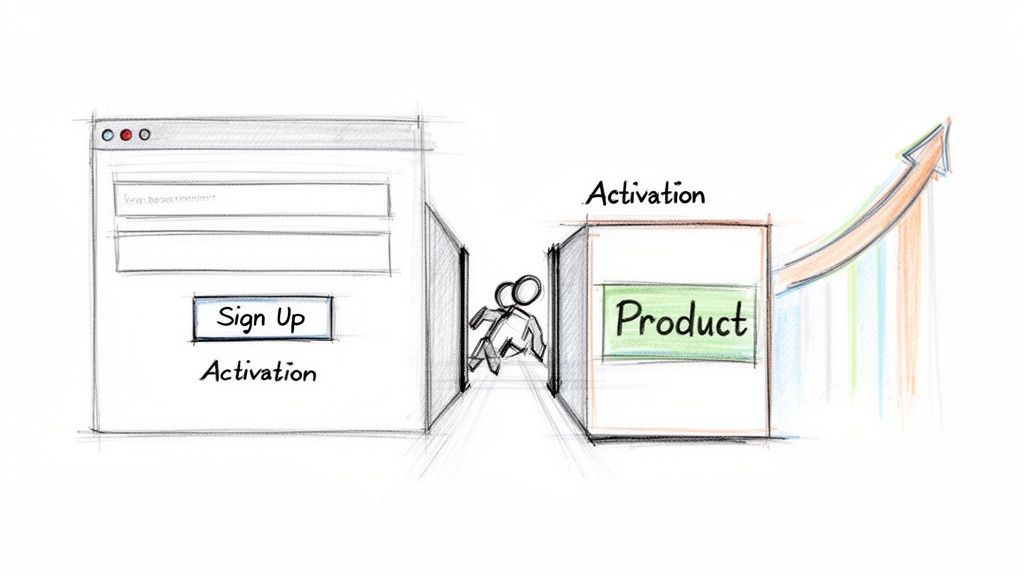
Think of your sign-up form as the front door to your business. If it’s locked, confusing, or demands a user’s life story, they’ll simply turn around and leave. It’s that simple. In the product-led world, the journey from discovering your tool to actually experiencing its value needs to be as short as humanly possible.
Every extra field you add, every confusing error message, and every unnecessary step creates friction. This friction kills momentum stone dead and stops users from ever reaching that “aha!” moment where they realise your product is indispensable. A streamlined flow, on the other hand, builds instant trust and quietly communicates that you respect their time.
The Immediate Impact of Simplicity
The payoff for optimising your sign-up process isn’t just theoretical; it’s tangible and hits your bottom line. A well-oiled flow has a direct impact on the metrics that actually matter:
- More Trial Conversions: Fewer steps to start a trial means more people successfully make it through the door.
- Higher User Activation: A quick sign-up gets users into your product faster, letting them perform key actions and see the value right away.
- Better Retention Rates: First impressions are everything. A smooth, welcoming onboarding experience sets a positive tone for the entire customer relationship.
This is especially true in fast-growing markets. Take Southeast Asia’s booming SaaS scene, where platforms offering one-click social logins see 40% higher conversion rates compared to those with clunky, multi-step forms. When you realise 65% of users will abandon a sign-up that takes more than 30 seconds, it becomes painfully clear that speed and simplicity aren’t just nice-to-haves—they’re essential.
Framing the Sign-Up as a Value Proposition
Ultimately, a streamlined account creation process is what turns curious visitors into loyal advocates and directly fuels your growth. It’s the very first promise you make: “We value your time, and we’re here to solve your problems, not create new ones.”
By removing these initial barriers, you ensure users stick around long enough to experience the magic you’ve built. For more on crafting compelling entry points, check out our guide on writing a powerful https://happypanda.ai/blog/call-to-action.
Designing a Frontend Users Actually Enjoy
Let’s be honest: a slick backend means nothing if your sign-up form feels like doing taxes. Your sign-up and login pages are the first real handshake with a new user. A clumsy one can send them running before they’ve even seen your product. The goal is to make the whole process so smooth, so intuitive, that they barely even notice it happened.
This isn’t about flashy animations or trendy gradients. It’s about clarity and cutting out the noise. Every single field, button, and error message should have one job: to get the user signed up or logged in without a single moment of confusion.
And it absolutely, positively has to work flawlessly on any device. A form that breaks on a phone isn’t just a bad look; it’s a lost customer. You can’t afford to lose someone because they tried to sign up on their commute.
Key UI Decisions for a Simple Sign Up Login
When you’re sketching out the UI, a few decisions will make or break the experience. One of the first is whether to combine sign-up and login into one form or keep them separate. A single “magic link” input can feel modern, but for most people, two distinct, clearly labelled forms—one for “Sign Up,” one for “Log In”—is the simplest way to avoid any ambiguity.
Then there’s the big one: social logins. Getting these right can slash friction and get people into your app faster.
- Placement is Key: Stick those “Continue with Google” or “Continue with GitHub” buttons right at the top, above the old-school email and password fields. People naturally look for the easiest path, so make it the first thing they see.
- Relevance Matters: Don’t throw every social login option at them. It’s just clutter. Building a dev tool? GitHub is a no-brainer. A general B2B SaaS? Google is your best bet. Pick one or two that make sense for your audience.
- Clear Labelling: Use the official logos and simple text like “Continue with Google.” It builds instant trust and tells the user exactly what’s going to happen.
It’s these small, thoughtful choices that add up to an experience that just works.
Crafting Helpful and Clear Error Messages
Nothing—and I mean nothing—is more infuriating than a form that just says, “An error occurred.” When something goes wrong, your interface needs to give immediate, helpful, and actionable feedback. This is where good client-side validation is your best friend.
Your form shouldn’t just tell a user that they made a mistake. It needs to tell them exactly what the mistake is and how to fix it. This turns a moment of frustration into a moment of guidance.
For instance, don’t just flash a generic “Invalid password” message. Give them real-time feedback as they type, like “Password must be at least 8 characters” or “Password needs a number.”
Sign-Up Form Field Strategy Comparison
When deciding what fields to include, remember that every single one adds a tiny bit of friction. You need to be ruthless. To help you decide, here’s a quick breakdown of the usual suspects.
| Field | When to Use It | Potential Friction Point |
|---|---|---|
| Full Name | When personalisation is critical for the first-run experience or emails. | Can feel a bit formal. “Your Name” is a friendlier, lower-stakes alternative. |
| Username | Only if your app has a social or public-facing community component. | It’s one more thing for users to create and remember. Avoid if you can. |
| Password Confirmation | Always. Just do it. It prevents typos and will save you a ton of “I can’t log in” support tickets. | Adds an extra field, but the payoff in reduced user frustration is huge. |
| Company Name | Absolutely essential for B2B SaaS to correctly set up team accounts. | Totally irrelevant and annoying for any B2C or prosumer tool. |
At the end of the day, every field on your sign-up form has to earn its place. For a truly simple sign up login, less is almost always more.
Getting this first interaction right sets the stage for a great user journey. A smooth sign-up is the first step toward successful customer onboarding, and it all starts with a form that respects the user’s time and attention.
Building a Secure and Scalable Backend API
Alright, with a user-friendly frontend in place, it’s time to build the engine that actually powers your authentication. This backend API is where all the critical logic lives—user registration, logins, you name it. Think of it as the gatekeeper, responsible for checking credentials, protecting user data, and managing who gets access to your app. A well-built API is what makes your simple sign up login process not just quick, but fundamentally secure.
We’re going to focus on a popular and reliable stack: Node.js with the Express framework. This combo is fantastic for creating fast, scalable APIs, making it a great choice for a product-led SaaS. The core ideas, though, apply to pretty much any backend tech you might prefer. The goal here is to build a solid foundation without over-engineering things right out of the gate.
If you’re looking for backend services that bundle in features like authentication from the start, it’s worth getting familiar with platforms like Supabase. You can find a good primer on What is Supabase to see if it fits your needs.
Here’s a quick visual of how the user journey should flow, covering both the classic email/password route and social logins.
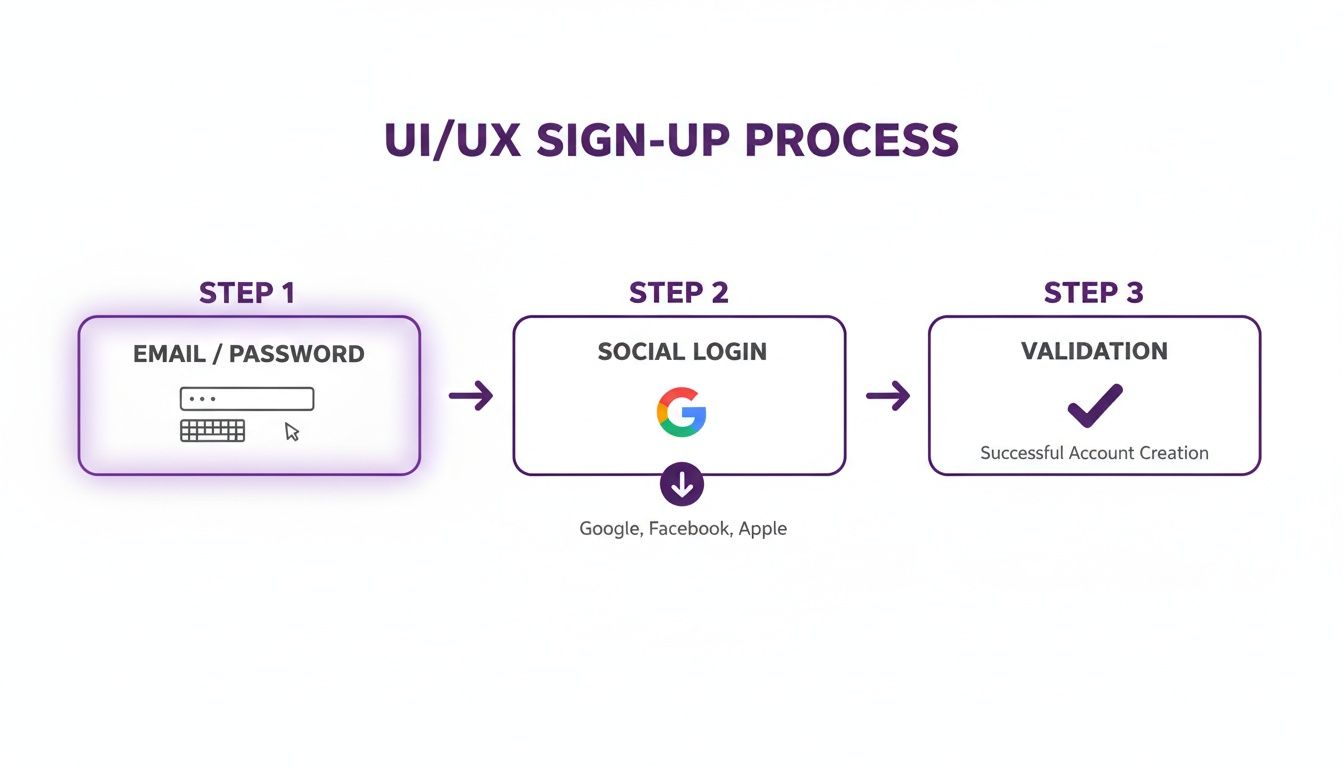
As you can see, giving users multiple ways to sign up is key to a modern, frictionless experience.
Handling Passwords the Right Way
Let’s get one thing straight: the single most critical job of your backend is protecting user passwords. Storing them in plain text isn’t just a bad idea; it’s a catastrophic security failure waiting to happen. The only acceptable approach is to use hashing and salting.
Here’s a quick breakdown of what that actually means:
- Hashing: This is a one-way street. It turns a password into a fixed-length string of characters that you can’t reverse to get the original password.
- Salting: Before hashing, you add a unique, random string (the “salt”) to each password. This ensures that even if two users have the exact same password, their stored hashes will be completely different. Smart, right?
For this job, the bcrypt library is a battle-tested workhorse. It’s designed to be deliberately slow, which is a feature, not a bug—it makes brute-force attacks painfully difficult for anyone trying to crack your users’ passwords.
When a new user signs up, your API will generate a salt, mix it with their password, hash the result with
bcrypt, and store only that final hash in your database. You never store the plain-text password itself. Period.
Managing Sessions with JSON Web Tokens
So, a user logs in. How does your app remember who they are as they click from page to page? For modern apps with a separate frontend and backend, JSON Web Tokens (JWTs) are the answer. JWTs offer a stateless way to handle authentication, which means your server doesn’t have to keep track of active sessions in its memory or a separate database.
This stateless approach is a huge win for scalability. Each JWT is a self-contained, digitally signed token holding key info about the user, like their user ID.
Here’s how the login flow works in practice:
- A user sends their email and password to your
/loginendpoint. - Your backend finds the user by email and uses
bcryptto compare the password they just sent with the hash you have stored. - If it’s a match, the server generates a JWT containing the user’s ID and an expiration date.
- This token is sent back to the frontend, which stores it securely (an HttpOnly cookie is a great choice).
- From then on, every request to a protected API route will include this JWT in the request header.
To secure your routes, you’ll write a small piece of middleware. This function will run before your main route logic, checking for a valid JWT in the request and verifying its signature. If the token is good, the request moves on. If not, it gets rejected with an “Unauthorized” error. This is the heart and soul of a secure and simple sign up login API.
Building Trust Right Out of the Gate
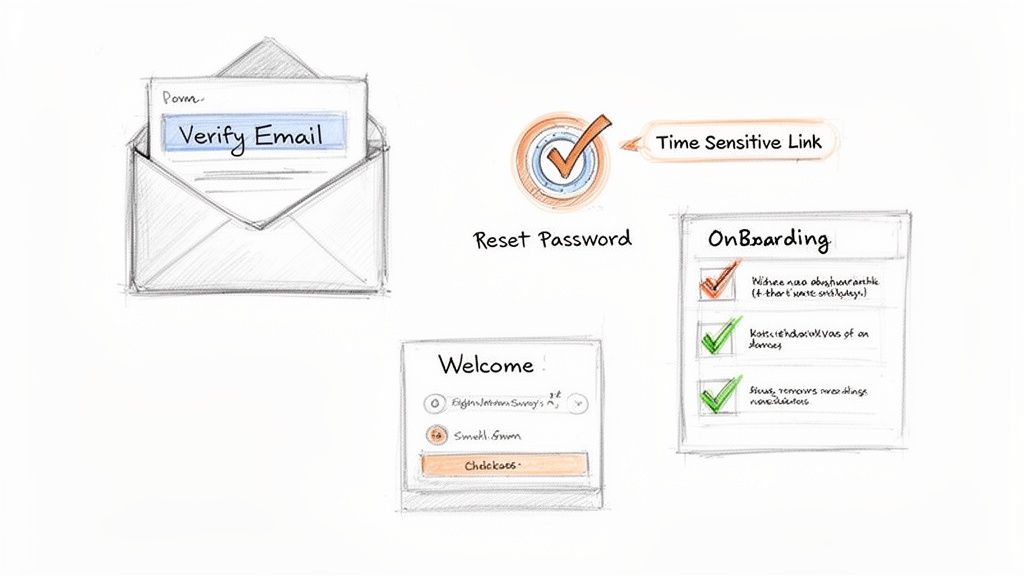
Look, a working sign-up form is table stakes. It gets a user in the door. But to turn that new account into an actual, engaged user, your system needs to prove it’s professional and secure. It’s these small, thoughtful details that separate a weekend side project from a real-deal product.
Two of the most critical features you need right after sign-up are email verification and a bulletproof password reset flow. Skipping these isn’t just a minor oversight; it’s a direct hit to your app’s credibility and the overall quality of your user base.
The Non-Negotiable: Email Verification
Think of email verification as your first line of defence against spam, bots, and the inevitable fat-fingered typo. It’s a simple check that confirms the person on the other end is real and actually has access to the email address they gave you. This is absolutely essential for keeping your user list clean and making sure your own emails don’t just bounce into the void.
The process itself is pretty straightforward:
- When a user signs up, you generate a unique, single-use token that expires reasonably quickly (say, 24 hours).
- You fire off an email to their address with a verification link containing that token.
- They click the link, your backend validates the token, marks their email as verified, and lets them into their new account.
This one small step has a massive impact. Verified emails mean higher deliverability for your welcome messages, onboarding tips, and any other critical notifications you need to send. To make sure these crucial emails actually land in the inbox, check out our guide on setting up a Gmail for a custom domain.
A Secure Password Reset Flow You Can Count On
People forget passwords. It’s going to happen. How you handle this common hiccup says a lot about your commitment to security. A solid password reset flow needs to be both easy for the user and a nightmare for anyone trying to exploit it.
Just like with email verification, this process relies on time-sensitive, single-use links. When a user requests a reset, your system sends them a unique link that takes them to a secure page where they can create a new password. The key here is to make that token expire fast—usually within an hour—to shrink the window of opportunity for it to be compromised.
One of the biggest mistakes I see is apps emailing users their old password or a temporary one in plain text. Never, ever do this. Always guide them through a secure process to create a new password themselves. It’s a fundamental trust signal you can’t afford to get wrong.
Connecting Your Sign-Up Flow to the Customer Journey
The moment a user verifies their email is the perfect time to kickstart their journey with your product. This is where your simple sign-up and login process stops being just a technical gateway and becomes a powerful engine for communication. By plugging in a tool like HappyPanda right after a successful sign-up, you can start building that relationship immediately.
For example, you could set up automations to trigger specific actions:
- A Welcome Survey: As soon as a user logs in for the first time, an in-app survey pops up asking about their goals.
- An Onboarding Checklist: Display a widget that walks them through the first few critical steps to find that “aha!” moment.
- Automated Feedback Requests: Set up a sequence to automatically ask for feedback after they’ve had a week to explore the app.
For micro-SaaS builders, these automated nudges are gold. Simple login flows that reliably fire off automations like “7 days after signup, send NPS” can lift retention by as much as 18%. This is more important than ever, as software and services are projected to hit 50% of emerging-sector investments. Small teams can manage thousands of user touchpoints without shelling out for expensive enterprise tools.
By connecting your authentication flow directly to your customer engagement tools, you create a seamless, supportive experience from the very first click.
Common Authentication Pitfalls to Avoid
Building an authentication system feels straightforward until a tiny mistake blossoms into a massive headache. As founders, we’re always moving at a breakneck pace, which makes it easy to stumble into common traps that can wreck your security and frustrate users. Getting your simple sign up login process right from the start means sidestepping these predictable issues.
One of the most dangerous—and surprisingly common—mistakes is storing passwords in plain text. It might seem like the easiest option when you’re racing to get an MVP out the door, but it’s a huge liability. A single database breach could expose every user’s password, destroying trust in your product in an instant.
Another classic error is giving away too much information in your error messages. Think about it: a login form that says “No user found with that email” versus “Incorrect password” literally tells an attacker which emails are valid in your system. This is a gift-wrapped invitation for them to find targets.
Your error messages should always be generic for security reasons. A simple, unified message like “Invalid email or password” reveals nothing, protecting your users’ privacy and making your system much harder to probe for weaknesses.
Creating Friction Instead of Flow
Security is obviously paramount, but it shouldn’t come at the cost of a good user experience. Founders often overcompensate with ridiculously complex password rules that end up doing more harm than good.
- Excessive Rules: Requiring a mix of uppercase, lowercase, numbers, and three different special symbols from an ancient alphabet only encourages users to write passwords down on sticky notes.
- No Rate Limiting: Without rate limiting on your login endpoint, you’re leaving the door wide open for brute-force attacks. Bots can try thousands of password combinations per second, and you wouldn’t even know it.
- Social Login Amnesia: We’ve all been there. Users forget which social provider they used to sign up (Google? GitHub?), get frustrated, and create a duplicate account. Your system should handle this gracefully by prompting them with, “It looks like you signed up with Google. Try logging in that way.”
Each of these pitfalls can be dodged with a little forethought. By focusing on established best practices—hashing passwords, giving vague error feedback, implementing rate limiting, and guiding users through social login confusion—you build a system that is both secure and genuinely easy to use. This isn’t just about technical correctness; it’s about respecting your users and building a trustworthy foundation for your product.
Your Burning Questions Answered
Building authentication always comes with its own set of “what ifs” and “should Is.” You’ve got a plan, but a few questions are probably rattling around in your head. Let’s tackle them head-on so you can keep moving without second-guessing your choices.
JWTs Or Old-School Sessions: What’s The Right Move For My SaaS?
For a modern SaaS, especially one with a separate frontend and backend API, the answer is almost always JWTs (JSON Web Tokens). They’re stateless, which is just a fancy way of saying your server doesn’t have to remember who’s logged in. This makes life so much easier when you start to scale and need to add more servers.
Traditional server-side sessions can feel simpler if you’re building a single, monolithic app. But the moment you start thinking about a distributed setup, they get messy. If you’re an indie hacker with dreams of growth, starting with JWTs is the smarter long-term bet.
Is Social Login Really A Must-Have For A New SaaS?
Absolutely. Especially if you’re building for a B2B audience or targeting developers. Think about it: offering a one-click login with Google or GitHub is the ultimate friction-reducer for your simple sign up login flow.
I’ve seen it firsthand—social logins can boost sign-up conversion by up to 40%. It saves users the headache of remembering yet another password and instantly builds a layer of trust.
You don’t need to support every platform under the sun. Just start with the one most relevant to your audience. Building a business tool? Go with Google. A developer product? GitHub is your best friend. Get that right, and you’ll make a huge impact from day one.
What’s The Single Most Important Thing For Password Security?
This one’s non-negotiable: never, ever, ever store passwords in plain text. If you take away only one thing, let it be this. You have to use a strong, one-way hashing algorithm like bcrypt or Argon2, and always add a unique “salt” for every single user.
Here’s why that combo is critical:
- Hashing scrambles the password so it can’t be reversed.
- Salting ensures that even if two users have the same password, their stored hashes will be completely different.
This isn’t just a technical best practice; it’s fundamental to protecting your users and your company’s reputation. It’s how you build a product that people can actually trust.
Ready to turn those new sign-ups into engaged, happy customers from the moment they log in? HappyPanda gives you all the tools you need—from onboarding checklists to automated feedback surveys—in one simple platform. Start your free trial today at https://happypanda.ai.