
If you’re an indie hacker or a SaaS founder, you’re probably paying a hidden tax without even realising it. It’s the hours you sink into manual operations, the monthly subscription fees for a dozen disconnected tools, and the mental load of trying to keep it all straight. This isn’t just a minor headache; it’s a direct brake on your growth.
The Hidden Costs of Manual SaaS Operations

This slow drain on your resources is something we often call the “bootstrapper tax,” and it adds up through all those small, repetitive tasks you do every day. Think about it: you’ve got one app for welcome emails, another for NPS surveys, and a third for sending product updates. This patched-together system can easily cost hundreds of dollars and countless hours every single month.
The true cost of running your SaaS manually really hits home when you’re stuck compiling automated marketing reports by hand. It’s soul-crushing. This is the exact moment when the need to automate business processes stops being a “nice-to-have” and becomes a core survival strategy.
The Financial and Mental Drain
The hit to your bank account is obvious, but it’s the mental cost that often gets overlooked. Every minute you spend on a manual task is a minute you aren’t spending talking to customers, shipping a new feature, or planning your next big move. That constant context-switching is a one-way ticket to burnout and kills innovation.
The goal here isn’t just to do things faster. It’s to free up your most valuable resource—your focus—so you can work on what actually grows the business.
This isn’t just a SaaS problem; it’s a universal truth that manual work just doesn’t scale. Just look at Southeast Asia’s industrial sector. Their automation market was valued at a massive USD 6.24 billion in 2023 and is expected to rocket to USD 17.54 billion by 2033. It’s a clear signal that efficiency is the name of the game, no matter the industry.
By automating strategically, you can stop paying this hidden tax. You can start reinvesting your time, money, and energy back where they truly belong: into your product and your customers.
Finding Your Highest-Impact Automation Opportunities
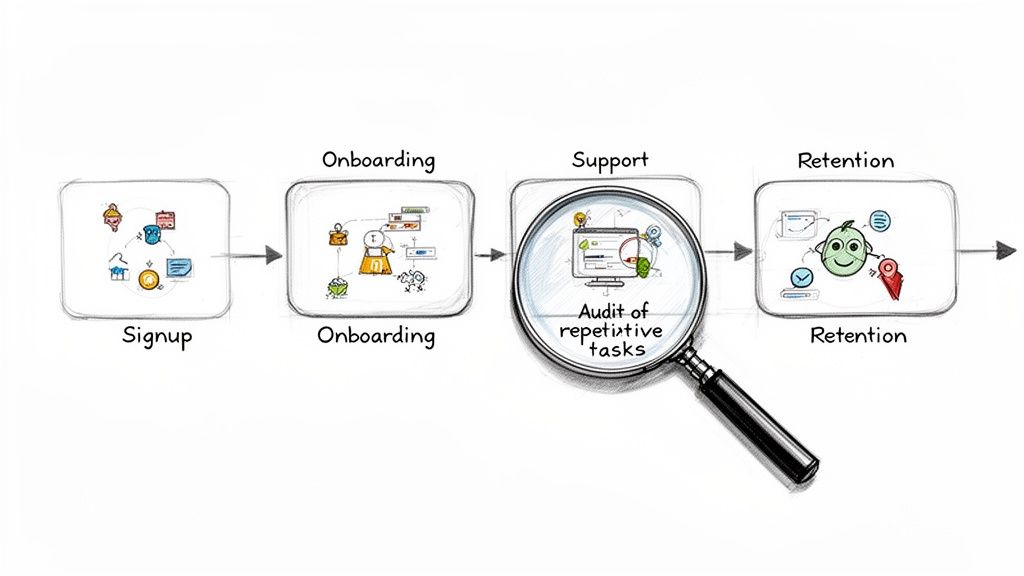
Before you can automate anything, you need a brutally honest map of where your time actually goes. Vague ideas won’t cut it. You have to audit your entire customer journey with a founder’s eye, hunting for those tiny, repetitive tasks that quietly steal your focus. This isn’t just about efficiency—it’s about really understanding the engine of your business.
So, let’s start by walking through the key stages of your customer lifecycle. Think from the second a user signs up for a trial to the moment they become a loyal advocate (or, let’s be real, churn). This mindset is a lot like what product teams do. If you want to dive deeper into that, check out our guide on implementing continuous product discovery in your SaaS.
The goal here is simple: pinpoint the exact moments you or your team have to jump in and do something manually. Don’t dismiss the small stuff; those little tasks are the ones that add up to a massive time sink over a month.
Auditing Your Customer Journey
Time to make this tangible. Grab a notepad or open a fresh document and trace the path a typical customer takes. For each stage, ask yourself one question: “What do I have to do by hand here?”
Here are the usual suspects to investigate:
- New User Signup & Onboarding: Are you personally firing off welcome emails? Do you manually check if a new user has completed those crucial first setup steps? This is low-hanging fruit for automation.
- Customer Support & Feedback: How do you handle common support questions? Are you manually sending feedback surveys after a support ticket closes or after a user has been active for a week?
- Trial Management & Conversion: Is someone on your team manually reminding users their trial is about to end? Are you personally following up with engaged trial users who haven’t pulled out their credit card yet?
- Retention & Advocacy: How do you spot your happiest users to ask for testimonials? Is there a manual process for reaching out to customers who are showing signs they might be about to leave?
To find those hidden gems where automation can really move the needle, it’s also worth looking into the principles of revenue intelligence. This approach is great for connecting your day-to-day operational data to actual financial outcomes.
By the end of this audit, you shouldn’t have a fuzzy idea of what to automate. You should have a concrete, itemised list of every single manual touchpoint in your business. This list is your raw material for building a smarter, more scalable SaaS.
High-Impact Automation Opportunities for SaaS Founders
To give you a head start, here’s a quick breakdown of common manual tasks across the customer lifecycle and what their automated counterparts look like. Think of this as your cheat sheet for spotting quick wins.
| Customer Journey Stage | Manual Task (The Time Sink) | Automated Workflow (The Solution) |
|---|---|---|
| User Signup | Sending a personal welcome email to every new user. | Trigger an automated, personalised welcome email sequence the instant a user signs up. |
| Onboarding | Manually checking if users completed key activation steps. | Set up event-based triggers to send helpful nudges or tutorials if a user gets stuck. |
| Trial Management | Manually emailing users with trial expiry reminders. | Automate a series of emails counting down to trial expiration, highlighting key benefits. |
| Customer Support | Answering the same basic questions over and over again via email. | Use a chatbot or helpdesk macro to instantly answer FAQs, freeing up human support for complex issues. |
| Feedback Collection | Sending out survey links manually after a support interaction. | Trigger a CSAT or NPS survey automatically 24 hours after a support ticket is closed. |
| Retention | Manually pulling data to identify at-risk users. | Create alerts based on inactivity or low usage triggers to flag potential churn before it happens. |
This detailed audit creates a solid backlog of opportunities. You’ll likely discover that 10-15 small tasks are eating up the majority of your non-product time. Once you have this list, you’re ready to shift from discovery to action—prioritising the jobs that will deliver the biggest bang for your buck with the least amount of upfront effort.
Right, you’ve audited your operations and now you’re staring at a list of potential automations as long as your arm. This is the exact moment where most founders freeze, caught in a classic case of analysis paralysis. “Where the heck do I even start?”
The temptation is to go after the biggest, gnarliest problem first. Resist it. The real key is to build momentum with a few strategic, early wins.
To slice through the noise, we use a simple but ridiculously effective framework: the Impact-Effort Matrix. This isn’t just about plucking the low-hanging fruit; it’s about picking the tasks that give you the biggest bang for your most valuable buck—your time. It’s how you automate business processes in a way that delivers real, tangible value, fast.
Defining Impact vs. Effort
For a SaaS founder, these words aren’t just business jargon; they have very specific, cash-in-the-bank meanings. You have to get this right for the matrix to do its magic.
- Impact: This is all about how much an automation will actually move the needle on a core business metric. Think in concrete terms: activation rates, trial-to-paid conversions, or customer retention. A high-impact automation gives one of your key performance indicators a noticeable nudge in the right direction.
- Effort: This boils down to founder hours. How much time will it really take you to design, build, test, and ship this thing? Be honest with yourself. A simple workflow might be an hour, but a more complex one could eat your entire weekend.
Once you plot your list of potential automations on a simple four-quadrant grid—Impact on the vertical axis, Effort on the horizontal—the path forward becomes crystal clear.
Your goal is to zero in on the “Quick Wins”—those juicy tasks sitting in the high-impact, low-effort quadrant. These are the automations that deliver visible results without dragging you into a massive, soul-crushing project.
A SaaS Scenario You’ve Probably Lived Through
Let’s get practical. Imagine you’ve flagged two potential automation projects:
- A Complex Win-Back Campaign: This is a beast. It involves a multi-step email sequence with all sorts of conditional logic to re-engage users who churned more than 90 days ago. The potential impact is… well, it’s decent. But the effort is seriously high. You’re looking at writing a ton of copy, meticulously segmenting user data, and building a workflow that looks like a bowl of spaghetti.
- An Automated Trial Expiry Reminder: This one’s a breeze. It’s a simple, two-email sequence reminding users their trial is ending in three days, and then again on the last day. The effort is ridiculously low—you could probably knock this out in under 30 minutes using a tool like HappyPanda.
While the win-back campaign sounds impressive, its impact is a bit of a gamble. The trial expiry reminder, on the other hand, targets users at the most critical moment of their journey. Its effect on your trial-to-paid conversion rate is likely to be immediate and dead simple to measure.
This is a textbook Quick Win. It addresses a pivotal part of the customer journey, needs minimal setup, and provides instant value. By tackling this first, you not only improve a key metric but also build the confidence and momentum you’ll need to take on the bigger automation projects later.
Starting small isn’t about thinking small. It’s about building a solid foundation for scalable growth, one smart automation at a time.
Building Your First Automated Workflows
You’ve got your prioritised list of quick wins. Nice. Now it’s time to stop planning and start doing.
This is where you turn those high-impact, low-effort ideas into actual, working systems that claw back your time, starting today. Don’t sweat it; this isn’t about becoming a software engineer overnight. It’s about setting up simple, logical chains of triggers and actions that just work.
Let’s walk through three essential automated workflows I think every SaaS founder should build from day one. These aren’t just hypotheticals—they are practical, battle-tested recipes designed to tackle make-or-break moments in the customer lifecycle. You’ll see exactly how a simple trigger, like a user clicking something, can kick off a powerful, hands-off process.
The Positive Feedback Loop
This first one is pure gold. It pinpoints your happiest users and automatically asks them for a testimonial right when they’re feeling the most love for your product. Doing this by hand is a time-sucking guessing game. Automated, it’s a machine for generating social proof.
Here’s the simple logic:
- The Trigger: A user gives you a high NPS score (say, a 9 or 10). This is the clearest signal you’ll ever get from a happy customer.
- The Action: A few hours later, the system automatically sends a follow-up email. It thanks them for the great feedback and asks if they’d be willing to share a testimonial, linking them straight to a submission form.
The beauty here is the timing. You’re making the request at the exact moment they’ve told you they’re happy, which massively increases the odds they’ll say yes. This simple sequence turns passive satisfaction into active advocacy for your brand.
Building a steady stream of testimonials isn’t just a nice-to-have for your marketing site; it’s a critical asset. It builds trust with new prospects and directly influences their decision to sign up.
The matrix below is a great way to visualise how you can categorise automation ideas like this one. It helps you stay focused on the highest-value tasks first.
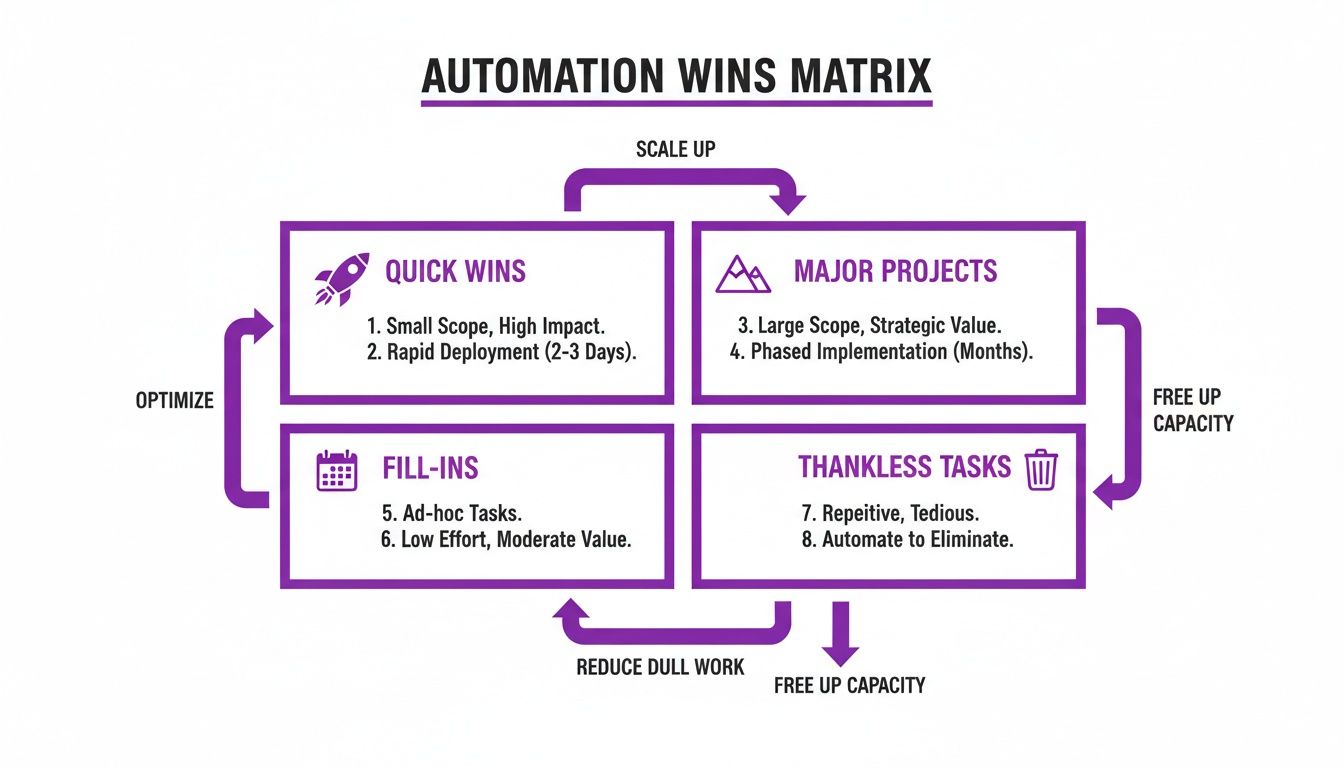
This impact-effort grid makes it obvious: a testimonial collector is a classic “Quick Win.” It delivers a serious marketing punch for very little setup effort.
The Onboarding Nudge
User onboarding is where SaaS products live or die. If a new user gets stuck and wanders off, they’re probably gone for good. This automation acts as a safety net, spotting users who haven’t hit a key activation milestone and giving them a gentle, helpful nudge.
- The Trigger: A user signed up but has not completed a crucial first action (like ‘created their first project’) within 48 hours.
- The Action: The system pings them an automated email with a subject line like, “A quick tip for creating your first project.” The email can link directly to a help doc or a short tutorial video.
This proactive tap on the shoulder shows you’re paying attention and actually want them to succeed. It’s far more effective than waiting for them to get frustrated and contact support—or worse, just ghost you completely. You can build even more advanced sequences with tools that provide pre-built SaaS automation recipes for exactly these kinds of scenarios.
The Trial Conversion Push
The final days of a free trial are a critical conversion window. This workflow is all about reminding users of your product’s value and shining a spotlight on a key premium feature just before their access expires. The goal is to make the decision to upgrade feel like a no-brainer.
This is a powerful strategy, and it’s not just for small SaaS. In Singapore, for example, 63.5% of firms are planning to automate a big chunk of their operations. Financial institutions there use AI for compliance, while in Thailand, AI-powered cloud services automate invoice management. It’s proof that smart workflows have a massive impact everywhere.
Here’s how you can apply that same laser focus to your trial conversions:
- The Trigger: A user’s trial is set to expire in three days.
- The Action: An email goes out highlighting a specific, high-value feature only available on paid plans.
- The Follow-Up: A final reminder email is sent on the last day of the trial, creating a touch of urgency and providing a clear call-to-action to upgrade.
These three workflows are perfect starting points to automate business processes in your SaaS. They’re simple to set up, they target high-leverage points in the customer journey, and they deliver measurable results almost immediately.
How to Measure and Improve Your Automations
Getting your first automations live feels like a huge win. But the real work—and the real magic—starts now.
Great automation is never a ‘set it and forget it’ task. Think of it as a living system that needs a bit of attention to deliver its full potential. Without checking in on how things are running, you’re just flying blind, hoping for the best.
The whole point of this exercise is to see a real, tangible return on the time you invested. You need to connect your shiny new workflows directly to the health of your business. This means looking past vanity metrics and focusing on the numbers that actually move the needle.
Key Metrics to Track Your Automation ROI
So, how do you know if your efforts to automate business processes are actually paying off? It’s all about tying each workflow to a specific, measurable goal. Don’t just track ‘emails sent’; track the outcome.
If you want to go deeper on this, we’ve got a whole guide on picking the right Key Performance Indicators.
Here are a few SaaS-specific examples to get you started:
- Onboarding Completion Rate: For that ‘Onboarding Nudge’ workflow, are more users actually reaching their “aha!” moment? Keep an eye on the percentage of new sign-ups who complete your key activation steps.
- Trial-to-Paid Conversion Rate: Is your ‘Trial Conversion Push’ convincing more people to pull out their credit cards? Even a tiny lift in this metric is a clear win and proves your automation is working.
- Testimonial Submissions: For the ‘Positive Feedback Loop,’ how many genuinely useful testimonials are you collecting each month? This directly fuels your marketing and builds social proof.
Avoiding Common Automation Pitfalls
As you start building more automations, it’s easy to fall into a few common traps. The biggest one is creating workflows without a clear business goal, but an equally dangerous mistake is letting the robots take over your brand’s personality.
Your human touch is a massive asset, especially for a smaller SaaS.
The best automation never feels like a robot takeover. It feels like incredibly timely, personal help arriving at the exact moment a customer needs it.
Keep an eye out for these red flags:
- Sounding Robotic: Is your email copy dry, generic, and impersonal? Always inject your brand’s voice and use personalisation tokens (like
{{first_name}}) to make it feel like a one-to-one conversation. - Ignoring the Goal: Does every single workflow have a specific, measurable objective? If you can’t state its purpose in one simple sentence, it might be automation for automation’s sake.
This balance is becoming even more critical as AI evolves. In fact, by 2026, agentic AI is expected to dramatically reshape customer service in regions like ASEAN, with a predicted 119% jump in agent deployments. This is huge for small businesses—which make up 99% of enterprises in places like the Philippines—allowing them to compete with giants by automating core tasks. You can get more insights on this from Rockwell Automation’s take on the next phase of manufacturing and automation in Asia.
Striking the right balance ensures your systems save you precious time while still delivering that thoughtful, human experience that turns users into loyal fans.
Got Questions About Business Automation?
Even with a solid plan, jumping into automation can stir up a few nagging questions. It’s smart to get those sorted out first. Let’s tackle some of the common worries that pop up when founders think about automating business processes for the first time.
Getting this right isn’t about flipping a switch and turning your SaaS into a cold, lifeless assembly line; it’s about being clever and strategic.
How Much of My SaaS Can I Realistically Automate?
It’s easy to get carried away with the dream of a fully autonomous business, but the reality is a bit more grounded. You can, and should, automate most of your repetitive, rules-based tasks. Think about your user onboarding emails, trial expiry reminders, feedback collection surveys, and basic support ticket routing. These are the things that eat up your time but don’t require a human touch every single time.
What you should never automate are the things that make you, well, you. Core product strategy, high-touch sales conversations with big potential clients, or resolving complex, emotionally charged customer support issues—these need a human. The goal is to automate the machine, not the relationship-building moments that give your brand its soul.
Will Automating Communication Make My Brand Impersonal?
This is a huge—and totally valid—fear. The short answer is: only if you do it badly. Poor automation feels robotic because it’s generic, poorly timed, and irrelevant. Great automation, on the other hand, feels like hyper-personal, incredibly timely assistance.
The secret is to use specific user actions as triggers. When an email lands in their inbox the exact moment they complete a key step in your app, it doesn’t feel robotic; it feels responsive and helpful. It shows you’re paying attention.
By personalising your automated messages with simple things like a user’s name ({{first_name}}) or company ({{company_name}}) and sticking to your unique brand voice, you can scale your communication without losing that personal touch that got you your first customers.
Single Platform vs. Multiple Integrated Tools?
For bootstrapped founders, this one is critical. Stitching together a bunch of specialised tools with an integrator like Zapier gives you a ton of flexibility, but it comes at a price. Suddenly you’re managing multiple subscriptions, wrestling with things breaking when one tool updates, and paying a hidden “complexity tax” in time and frustration.
A single, unified platform just simplifies your life. It cuts down your monthly software bill, keeps all your data in one place, and makes building smart, cross-functional workflows (like “if a user’s NPS score is high, then send them a request for a testimonial”) incredibly straightforward.
When Is the Right Time to Start Automating?
Honestly? The best time was yesterday. The second-best time is right now. Don’t wait until you’re completely underwater.
You should start automating the moment you have a process you know you’ll have to repeat. Even if you only have a handful of users, setting up a simple welcome email sequence or an onboarding checklist builds a solid foundation. It establishes good habits and ensures your customer experience is consistent and professional from day one, setting you up to scale without the growing pains.
Ready to stop paying the bootstrapper tax and start building a smarter, more scalable SaaS? HappyPanda combines email sequences, feedback surveys, onboarding checklists, changelogs, and testimonial collection into one simple platform. Get started in minutes, not weeks. Explore HappyPanda’s features and start your free trial.