
A solid bug report template is the quickest way to turn those vague, head-scratching user complaints into actionable tasks your dev team can actually sink their teeth into. It sets up a clear, standardised format, making sure every crucial detail—from reproduction steps to environment specifics—is captured right from the get-go.
Why a Great Bug Report Template Matters
Let’s be honest—a vague bug report is a fast track to nowhere. We’ve all seen them: tickets that just say “the login button doesn’t work” with zero context. That kind of ambiguity forces developers to waste precious time playing detective, chasing down basic info instead of, you know, actually fixing the bug.
A well-structured bug report template cuts out all that friction.
By standardising how your team reports issues, you create a common language that everyone—from testers to project managers to developers—understands. This isn’t just about adding fields to a form; it’s about building a much more efficient communication pipeline. It transforms bug reporting from a chaotic mess into a streamlined, predictable process.
The payoff is immediate:
- Faster Fixes: Developers get all the information they need upfront, which dramatically cuts down on diagnosis time.
- Less Frustration: The endless back-and-forth communication gets slashed, keeping team morale from tanking.
- Fewer Invalid Reports: The dreaded “Can’t Reproduce” tag becomes a rarity rather than the norm.
This visual perfectly illustrates how a structured feedback process, like the one a bug report template creates, keeps everyone on the same page.
That kind of alignment is absolutely crucial for building a high-quality product and maintaining a healthy, forward-moving development cycle.
The Impact of Clear Reporting
The benefits of a good template go way beyond just efficiency. In the real world, software teams report that rolling out approved bug templates cuts down on duplicate or invalid bug reports by over 25%. That’s a huge deal, especially when you consider that an unclear report can easily double the time it takes to close an issue.
Digging deeper, teams using these structured reports often see tester satisfaction scores jump by 15-20% simply because the communication is so much smoother.
A great bug report is more than just a document; it’s a conversation starter. It tells the full story so a developer can understand the problem’s context, impact, and urgency without needing a single follow-up question.
Ultimately, this organised approach reinforces the core principles of Quality Assurance in Software Development by making the entire bug-fixing process more predictable and effective. It becomes a key part of the product development lifecycle, ensuring that feedback isn’t just collected, but acted upon. For more on this, check out our guide on https://happypanda.ai/blog/closing-the-feedback-loop to see how structured reporting fits into the bigger picture.
Right, let’s get into the bones of a great bug report. Here’s a reusable, battle-tested template you can grab and start using immediately.
Think of each part of the report as a piece of a puzzle. When you put them all together correctly, you give developers a complete picture of the problem. This clear view cuts out the guesswork and gets them straight to the fix.
It’s a bit like understanding a work order; every field has a specific job to do, turning a vague problem into an actionable task. Let’s break down what makes a report truly effective.

Core Identifying Information
These first few fields are the headlines. They give developers the at-a-glance context needed to understand and categorise the issue without even opening the ticket.
- Title/Summary: A short, sharp summary of the problem. Be specific. Something like, “User profile pictures fail to upload on Safari” tells a developer exactly what they’re dealing with.
- Description: A quick paragraph that adds a little more colour to the title. This is where you can explain the bug’s impact on the user or add any extra context the summary might have missed.
The Non-Negotiable Details
Next up are the absolute essentials. Without these details, you’re essentially sending your developers on a wild goose chase. A recent study found that around 75% of high-quality bug reports included these well-structured details, which can slash resolution time by up to 30%. If they can’t reproduce the bug, they can’t fix it. Simple as that.
- Steps to Reproduce: A clear, numbered list of the exact actions you took to trigger the bug. Be meticulous here—assume the developer knows nothing about what you were doing.
- Expected vs. Actual Results: This is crucial. Clearly state what you expected to happen versus what actually happened. The contrast between the two is often where the root of the problem lies.
- Environment Details: Don’t forget the specifics of where you found the bug. List the operating system (e.g., Windows 11, macOS Sonoma), browser and version (e.g., Chrome 125.0), device type (e.g., iPhone 15 Pro), and screen resolution.
The goal of a bug report isn’t just to state a problem; it’s to give a developer a repeatable recipe for failure. If they can reliably recreate the bug, they can reliably fix it.
To help you remember what’s most important, here’s a quick summary table of the key components.
Key Components of an Effective Bug Report
| Component | Purpose | Quick Tip |
|---|---|---|
| Title/Summary | Provides a quick, scannable overview of the issue. | Be specific and concise. “Button doesn’t work” is bad; “Submit button on contact form unresponsive” is good. |
| Description | Adds context and explains the user impact. | Briefly explain why this bug matters from a user’s perspective. |
| Steps to Reproduce | Gives developers a clear path to replicate the bug. | Number your steps and be painstakingly detailed. Assume zero prior knowledge. |
| Expected vs. Actual | Defines the malfunction by highlighting the difference. | Use a clear “Expected:” and “Actual:” format to show the contrast. |
| Environment Details | Narrows down the conditions under which the bug occurs. | Include OS, browser, device, and version numbers. This is critical for isolating the problem. |
Getting these fields right consistently is the secret to writing reports that developers love and that get fixed fast.
Valuable Supporting Information
While the core details are non-negotiable, these extra pieces of information can elevate a good report to a great one. They provide layers of context that help with prioritisation, organisation, and deeper investigation.
- Priority/Severity: These help teams triage effectively. Severity measures the bug’s technical impact (e.g., a critical crash), while Priority dictates how quickly it needs fixing based on business goals.
- Attachments: Screenshots and screen recordings are worth their weight in gold, especially for visual UI bugs. Don’t just attach them—annotate them to point out the exact problem area.
- Labels/Tags: Use labels for better organisation and filtering within your tracking tool. Common tags like
ui-bug,backend,performance, orregressionmake it much easier to spot patterns and manage the backlog.
Writing Bug Reports That Get Fixed Faster
Having a solid bug report template is a great start, but the real magic is in how you fill it out. A well-written report is more than just data; it’s a clear, persuasive piece of communication designed to make a developer’s job as easy as possible. The goal is to anticipate their questions and answer them before they even have to ask.
You need to shift your mindset from simply reporting a problem to guiding someone to the solution. When a developer can understand an issue at a glance and reproduce it on their first try, your report jumps to the top of their to-do list. It becomes an easy win, and easy wins get fixed quickly.
Crafting a Title That Tells a Story
The title is the first thing anyone sees, and it should be a powerful, concise summary of the entire issue. A vague title like “Profile Page Bug” is a red flag for developers, signalling a poorly documented ticket that’s going to require a lot of back-and-forth. Nobody wants that.
Instead, aim for a title that is both descriptive and specific. A good formula to follow is [Feature/Area] - [Specific Problem]. This structure provides immediate context and gets right to the point.
- Bad Title: “Image upload broken”
- Good Title: “User Avatars - Upload fails for PNG files over 2MB”
The second title tells the developer exactly where the problem is (User Avatars), what’s happening (upload fails), and under what specific conditions (PNG files, >2MB). They can immediately start forming a hypothesis about the cause—maybe a file size limit or a MIME type validation issue—before they’ve even opened the ticket.
Think of your bug report title as the subject line of an email you desperately need someone to open and act on. If it’s vague or unhelpful, it will get ignored. Be specific, be clear, and provide immediate context.
Writing Steps That Leave No Room for Doubt
The “Steps to Reproduce” section is the most critical part of your entire bug report. This isn’t the place for assumptions or shortcuts; you need to write a literal, step-by-step recipe for recreating the bug. Assume the developer has zero context about what you were trying to do.
Your steps should be:
- Numbered: This creates a clear, sequential flow that is easy to follow. Simple, but effective.
- Unambiguous: Use precise language. Instead of “click the profile button,” say “Click the user avatar in the top-right navigation bar.”
- Minimal: Only include the absolute necessary steps to trigger the bug. Extraneous actions just confuse the investigation.
This meticulous approach eliminates the dreaded “cannot reproduce” response. When a developer can follow your exact steps and see the same failure, you’ve removed the biggest obstacle to getting the bug fixed. The clearer your instructions, the faster the resolution. Your goal is to make the bug appear on their screen just as it did on yours.
Seeing Bug Reports in the Wild
Theory is great, but let’s be honest—it’s seeing a solid bug report template filled out for a real problem that makes everything click. To bring these ideas to life, we’ll walk through three classic scenarios: a quirky UI glitch on a desktop web app, a stubborn functionality bug on mobile, and a regression issue that’s reared its ugly head again.
You’ll notice each example uses the same core structure. That’s the beauty of a good template—it’s flexible enough to handle wildly different problems while giving developers the exact details they need to get started.
Desktop UI Bug Example
Visual bugs pop up all the time, and their cause is often tied to a specific environment. A report that just says “the button is broken” is a one-way ticket to frustration. A detailed one, however, is a treasure map leading straight to the problem.
Imagine a user trying to update their profile. The “Save Changes” button is misaligned and overlaps the footer, but only when they’re using Safari.
Here’s what a great report looks like:
- Title: UI - “Save Changes” button overlaps footer text on Safari
- Description: When editing the user profile, the main action button is positioned incorrectly, making the footer links hard to click. Looks like a CSS alignment issue specific to Safari.
- Environment: macOS Sonoma 14.5, Safari 17.5
- Steps to Reproduce:
- Log in to the app using Safari.
- Go to the “My Profile” page.
- Click “Edit Profile.”
- Scroll to the bottom of the page.
- Expected Result: The “Save Changes” button should sit cleanly above the footer with a bit of space.
- Actual Result: The “Save Changes” button renders too low and covers the footer text.
- Attachment:
safari_button_overlap.png(A screenshot with the overlapping area highlighted)
This report is instantly actionable. The developer knows the feature, the browser, and exactly what to look for. No guesswork needed.
Mobile App Functionality Bug Example
Mobile bugs throw in extra variables like different operating systems, screen sizes, and even device orientation. Nailing down these details isn’t just helpful; it’s essential.
Let’s say a user discovers they can’t add an item to their shopping cart after rotating their phone. Weird, right?
- Title: Functionality - “Add to Cart” button unresponsive after screen rotation on iOS
- Description: On the product details page, the “Add to Cart” button stops working if the device is rotated from portrait to landscape and back. The app doesn’t crash, but the button just won’t respond to taps.
- Environment: iPhone 14 Pro, iOS 17.4.1, App Version 2.3.1
- Steps to Reproduce:
- Open the app and go to any product page.
- Rotate the device to landscape.
- Rotate it back to portrait.
- Tap “Add to Cart.”
- Expected Result: The item should be added to the shopping cart.
- Actual Result: Tapping the button does nothing. The cart remains empty.
- Attachment:
cart_bug_orientation.mp4(A quick screen recording showing the bug in action)
The screen recording is the clincher here. It leaves zero room for misinterpretation.
Regression Bug Example
A regression is when a bug that was already fixed mysteriously comes back to life. These are especially maddening for everyone, so a little historical context goes a long way. Referencing the original ticket can shave hours off the debugging process.
Regressions often happen when new code accidentally tramples on an old fix. Linking to the original report gives developers a massive head start by showing them exactly where the fix was last applied.
- Title: Regression - User session timeouts no longer extended by activity
- Description: Users are getting logged out after 15 minutes of inactivity, even while actively typing in text fields. This was fixed in
BUG-1234but has started happening again since the last release. For more on gathering this kind of user intelligence, check out our guide on creating a sample customer feedback form template. - Environment: Windows 11, Chrome 125.0, Production
- Steps to Reproduce:
- Log in to the application.
- Go to the “Project Notes” section.
- Start typing in a large text area but don’t save or click anything for 16 minutes.
- Expected Result: The session should stay active because typing counts as user activity.
- Actual Result: The user is logged out with a “Session Expired” message.
- Linked Issue: Relates to
BUG-1234
Integrating Your Bug Reports into Your Workflow
A perfect bug report is useless if it just gets lost in the digital void. The real magic of a well-crafted bug report template only happens when it connects seamlessly with your team’s existing tools and processes. The goal here is to create a frictionless path from the moment a bug is submitted to when a developer is assigned, cutting out as much manual triage as possible along the way.
This means moving beyond just filling out a form. You need to build a system that automatically routes information where it needs to go. Modern project management tools are built for exactly this. For instance, you can easily set up automations in platforms like Jira or Linear to instantly assign a bug report to the correct project board based on tags or components. A report tagged ios-ui can land directly in the mobile team’s backlog without anyone lifting a finger.
Automating the Flow of Information
Even simple automations can have a massive impact on your team’s responsiveness and efficiency. Think about setting up a rule that pings a specific Slack channel whenever a bug with ‘Critical’ severity is filed. That immediate visibility ensures high-impact issues get attention in minutes, not hours.
This kind of proactive approach is especially vital given the current security landscape. In Southeast Asia, web applications make up a staggering 67% of the top attacked technologies. A structured bug report that clearly captures severity and reproduction steps is your first line of defence in identifying vulnerabilities quickly. In fact, organisations that use structured templates can cut their vulnerability patch times by nearly 40%. You can read the full research on the cyber threat landscape to really grasp the impact.
The most effective bug management systems don’t just collect data; they move it. Your template should be the starting point of an automated workflow, not the end of a manual reporting task.
This process flow shows how different types of bugs—UI, functionality, and regression—can be neatly categorised within your workflow.
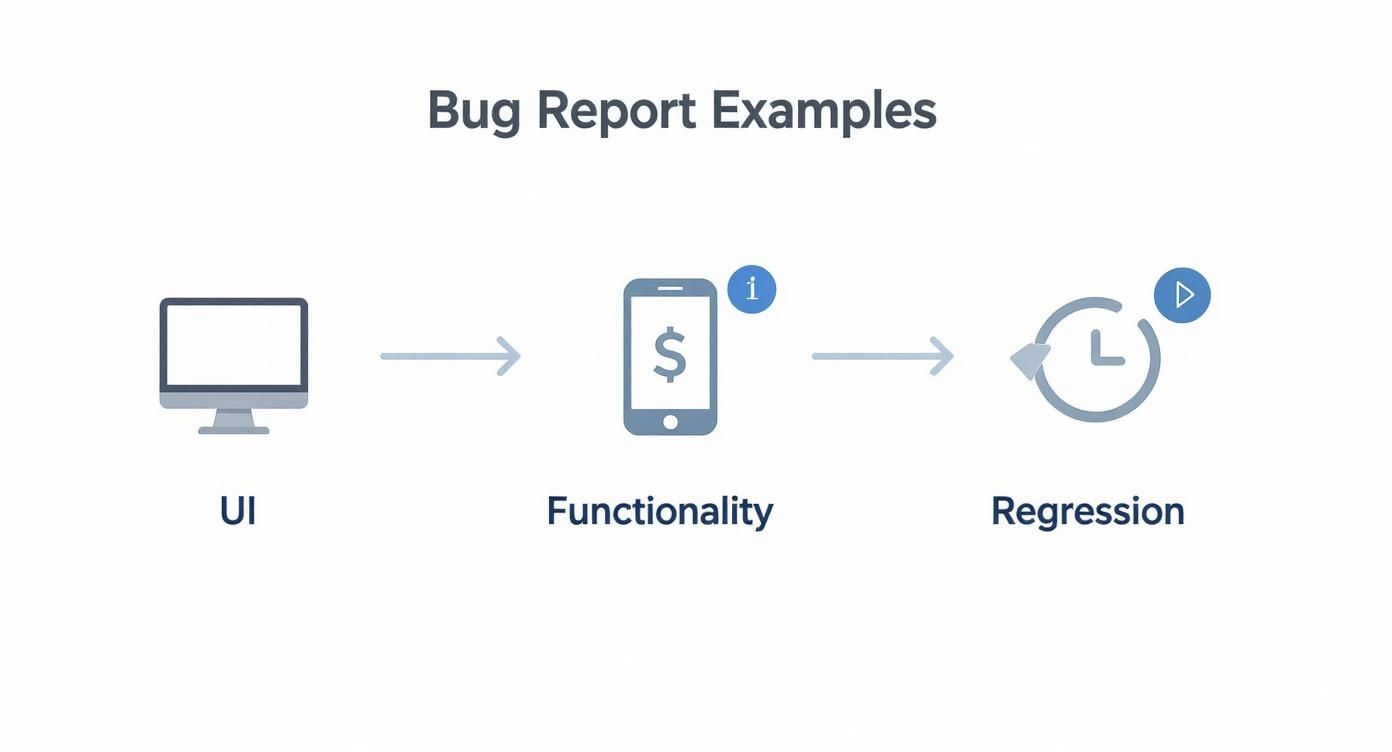
Visualising the bug lifecycle this way helps teams standardise how they handle different issues, which brings much-needed consistency from the moment a report is filed to its final resolution.
Using Webhooks to Centralise Feedback
Another powerful technique is using webhooks. A tool like HappyPanda can act as a central hub for user feedback, funnelling reports from all sorts of sources into one organised place. From there, you can use a webhook to push new bug reports from HappyPanda directly into your development backlog.
This creates a unified system where all feedback, whether it comes from an internal QA tester or an end-user, follows the same efficient path. Building a robust system for this is a core part of effective software defect tracking, as it ensures absolutely nothing slips through the cracks.
Answering Your Burning Bug Reporting Questions
Even with a killer template, a few questions always seem to surface when you’re in the middle of writing a bug report. Let’s clear up some of that grey area so you can get back to shipping great software.
Priority vs Severity: What’s the Real Difference?
This one trips up everyone, from junior testers to seasoned vets. While priority and severity sound like they could be twins, they measure two totally different things and are used by different people to make decisions.
Here’s the breakdown:
- Severity: Think of this as the technical impact. How badly does this bug break things? A critical severity bug might be one that crashes the entire app or wipes out user data. It’s an objective call made by the person reporting it (usually a QA tester) to signal how destructive the issue is.
- Priority: This is all about business urgency. How quickly does this need to be fixed? A product manager or team lead usually sets the priority, answering the question, “When should the team drop what they’re doing to work on this?”
It’s entirely possible for a bug to be high severity but low priority. Imagine a feature that crashes the app, but only on a discontinued phone model used by 0.01% of your users. It’s severe, for sure, but probably not a top priority.
On the flip side, a simple typo in the company’s name on the homepage is low severity (it’s not breaking anything functional), but you can bet the marketing team wants that fixed with high priority.
How Much Detail Is Too Much?
It can be tempting to document every single click you made leading up to a bug, but writing a novel rarely helps. The goal is to be concise yet complete. You want to give a developer a repeatable recipe for failure, not bury them in fluff.
As a rule of thumb, only include the minimum information needed to reliably reproduce the bug. If a step or detail doesn’t change whether the bug appears, cut it.
Zero in on crystal-clear reproduction steps, the environment details, and a sharp “expected vs. actual” outcome. Your personal feelings about the feature or a play-by-play of what you did ten minutes before finding the bug just adds noise. Stick to the facts.
What If I Can’t Reproduce a Bug Every Single Time?
Ah, the dreaded intermittent bug. They’re a headache for everyone involved, but that doesn’t mean you should ignore them. If you find a bug that only pops up now and then, report it, but make sure you flag its flaky nature.
Be upfront in your report. State that the issue is intermittent and give a rough idea of how often it happens, like “This seems to occur about 1 in 5 attempts.”
This is where extra context becomes gold. Logs, screen recordings, and detailed environment info are your best friends here. They might just hold the clue a developer needs to finally track down and squash that elusive problem.
Ready to stop chasing down bug details and start fixing issues faster? HappyPanda brings all your user feedback, bug reporting, and customer communication into one streamlined platform. Create perfect bug reports, automate feedback loops, and get back to building. Explore HappyPanda today.